Works
MuseFinder
About "MuseFinder"
MuseFinder is a Desktop first website that allows users to view museums around them and all the features that they offer.
Project Duration: 1 week
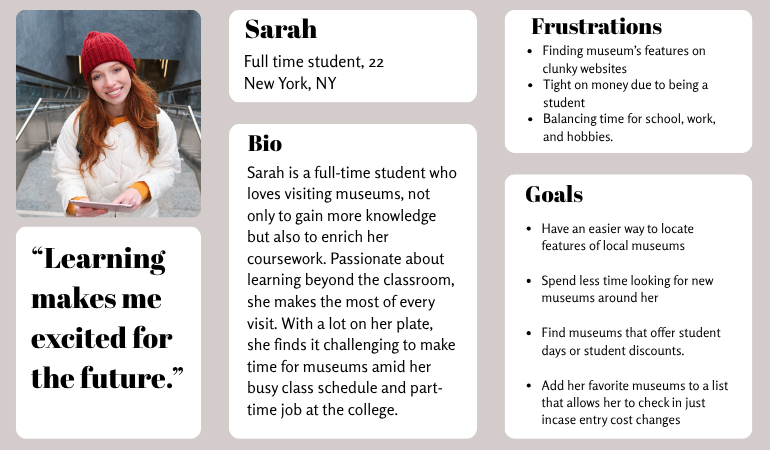
Persona # 1: The student:
Budget conscious and academically driven, these students actively seek meaningful cultural experiences to complement their studies. They frequently look for student discounts, free admission days, student nights, and educational programs that align with their interests or coursework.
With packed schedules filled with classes, part time jobs, and assignments, they need a fast and effortless way to find nearby museums, quickly understand what each offers, and determine whether it’s worth their limited time and money.
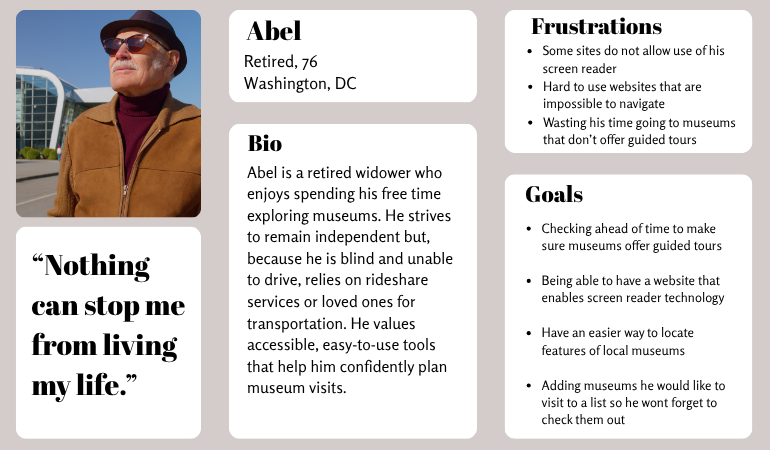
Persona # 2: The visually impaired senior:
Many elderly seniors who are visually impaired remain eager to enjoy cultural experiences and stay socially active. They rely on screen readers and voice technology to browse information online and need reliable details about guided tours, senior discounts, accessibility accommodations, and transportation options.
Because most in this group no longer drive, they depend on family, friends, or ride sharing services to get around. This makes planning museum visits more complex and requires clear, advance information. Many are also not highly confident with technology, which adds another layer of difficulty when navigating poorly designed websites or apps.
Both people may have different frustrations and goals but what is consistent is the need to find features easily.
Ideation Process
How can I make the process simple to use and easy for people of all ages to navigate? Will people want a way to save favorite museums to an easily found list?
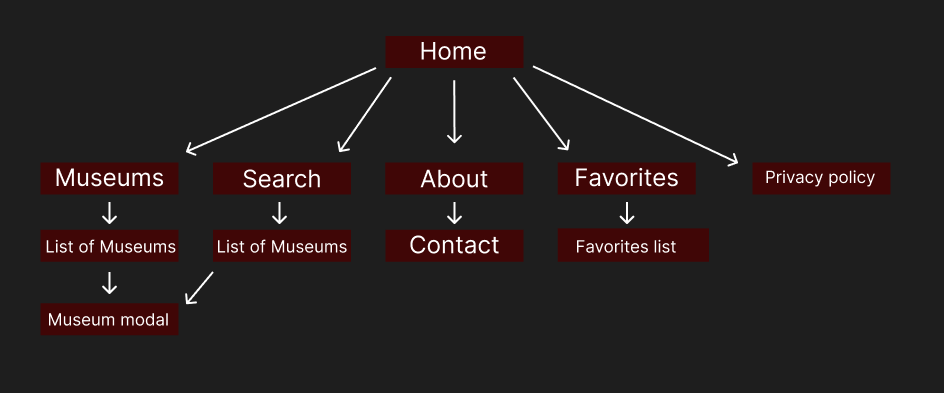
Sitemap showing simple and clean navigation.
Foundation
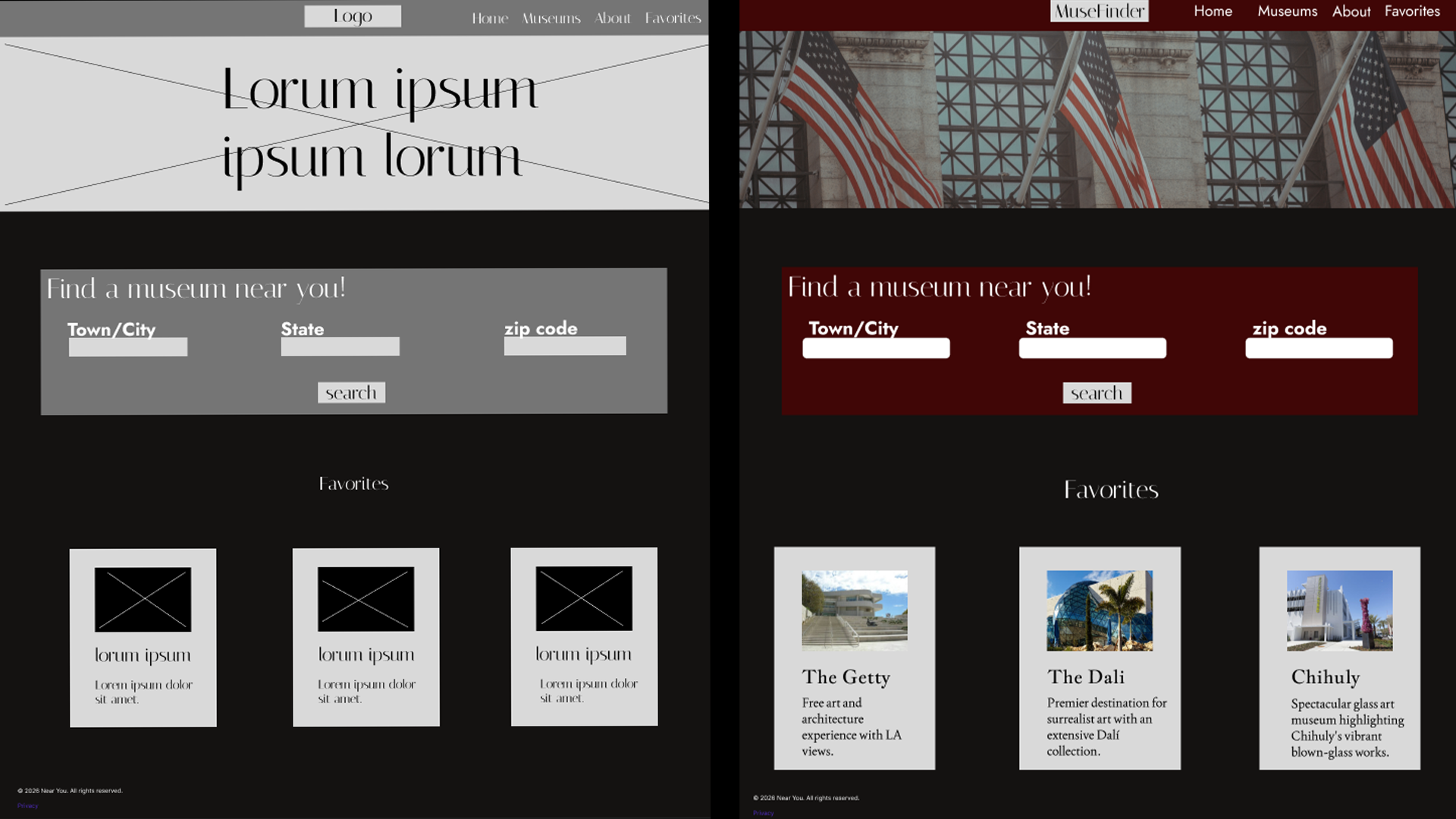
Side by side of both wireframe and mock up of the MuseFinder Homepage.
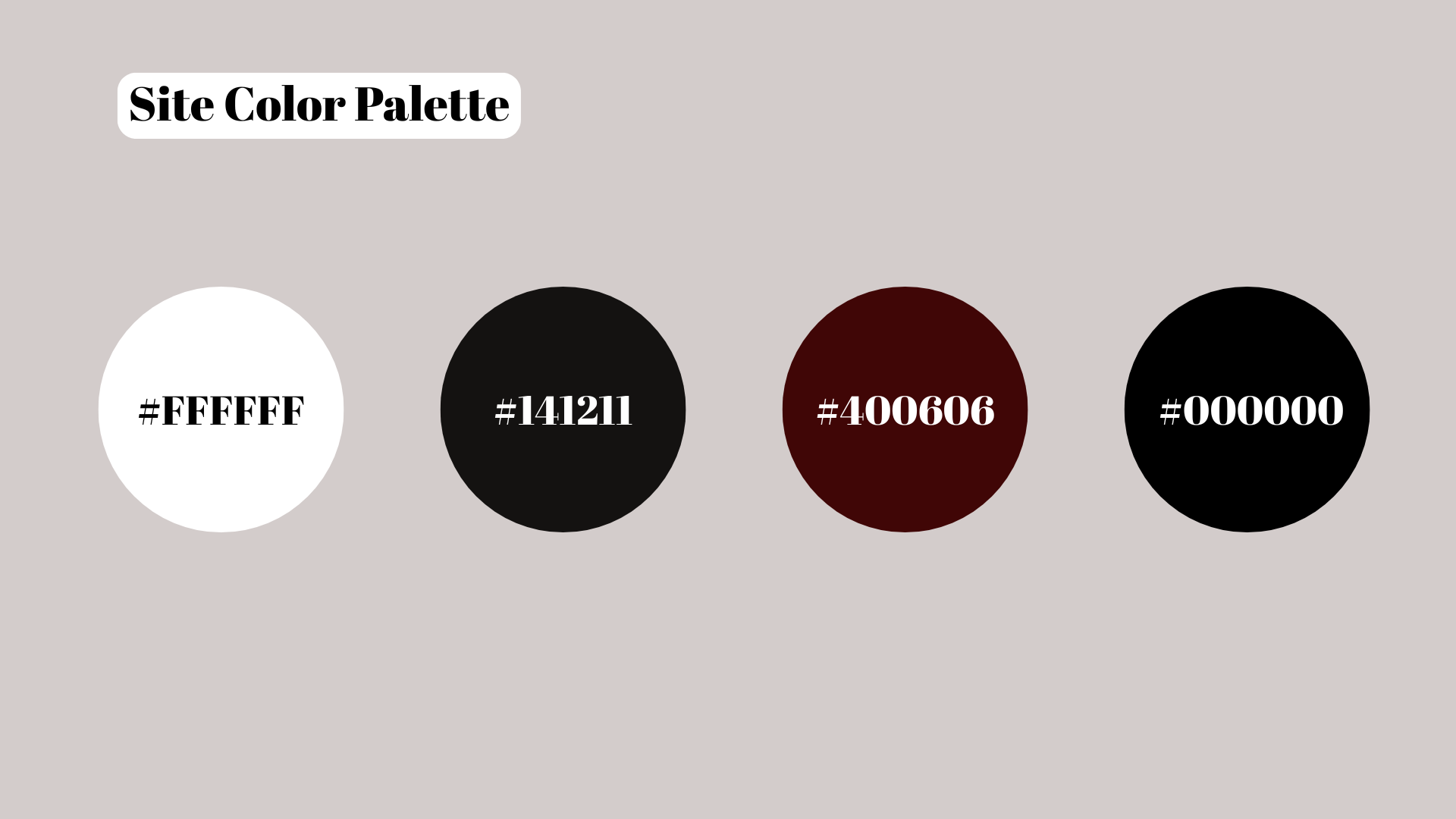
I chose these 4 colors to keep the site elegant but not over the top. When I think of museums I think of simplicity and elegance.

What inspired my choice to name the site MuseFinder was the fact that Muse is not just short hand for Museum but every artist has a muse.
Final Prototype
Want to do your own exploring? Check out the prototype Here.
Ideas to build on
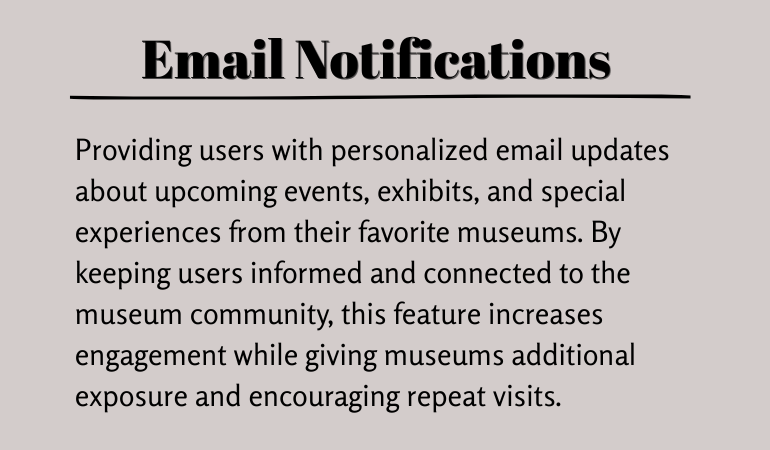
Some of the future ideas that would make this website even better.


Insights Gained
Designing MuseFinder was especially meaningful because I am an avid museum enthusiast. My personal experiences helped me recognize common challenges users face when searching for museums and accessing important information, which inspired me to create a solution that makes discovering museums simple, accessible, and efficient.
Throughout the project, I learned that simplicity can have the greatest impact. While there are additional features I would love to explore in future iterations, I chose to prioritize a clean, intuitive experience that helps users find what they need without feeling overwhelmed. This project reinforced the importance of balancing functionality with usability, ensuring that every design decision supports a seamless and enjoyable user experience.
Persona # 1: The student:
Budget conscious and academically driven, these students actively seek meaningful cultural experiences to complement their studies. They frequently look for student discounts, free admission days, student nights, and educational programs that align with their interests or coursework.
With packed schedules filled with classes, part time jobs, and assignments, they need a fast and effortless way to find nearby museums, quickly understand what each offers, and determine whether it’s worth their limited time and money.
Persona # 2: The visually impaired senior:
Many elderly seniors who are visually impaired remain eager to enjoy cultural experiences and stay socially active. They rely on screen readers and voice technology to browse information online and need reliable details about guided tours, senior discounts, accessibility accommodations, and transportation options.
Because most in this group no longer drive, they depend on family, friends, or ride sharing services to get around. This makes planning museum visits more complex and requires clear, advance information. Many are also not highly confident with technology, which adds another layer of difficulty when navigating poorly designed websites or apps.
Both people may have different frustrations and goals but what is consistent is the need to find features easily.
Ideation Process
How can I make the process simple to use and easy for people of all ages to navigate? Will people want a way to save favorite museums to an easily found list?
Sitemap showing simple and clean navigation.
Foundation
Side by side of both wireframe and mock up of the MuseFinder Homepage.
I chose these 4 colors to keep the site elegant but not over the top. When I think of museums I think of simplicity and elegance.

What inspired my choice to name the site MuseFinder was the fact that Muse is not just short hand for Museum but every artist has a muse.
Final Prototype
Want to do your own exploring? Check out the prototype Here.
Ideas to build on
Some of the future ideas that would make this website even better.


Insights Gained
Designing MuseFinder was especially meaningful because I am an avid museum enthusiast. My personal experiences helped me recognize common challenges users face when searching for museums and accessing important information, which inspired me to create a solution that makes discovering museums simple, accessible, and efficient.
Throughout the project, I learned that simplicity can have the greatest impact. While there are additional features I would love to explore in future iterations, I chose to prioritize a clean, intuitive experience that helps users find what they need without feeling overwhelmed. This project reinforced the importance of balancing functionality with usability, ensuring that every design decision supports a seamless and enjoyable user experience.
Problem
Discovering museums nearby and understanding their unique offerings remains frustratingly difficult for many visitors. While location based searches exist, most platforms provide only basic information, making it nearly impossible to quickly find museums that match specific needs such as accessibility features for disabilities, discounted tickets, guided tours, family friendly programs, or special exhibitions.
As a result, potential visitors often miss meaningful cultural experiences, while museums struggle to effectively connect with their target audiences.
Target Audience
Persona # 1: The student:
Budget conscious and academically driven, these students actively seek meaningful cultural experiences to complement their studies. They frequently look for student discounts, free admission days, student nights, and educational programs that align with their interests or coursework.
With packed schedules filled with classes, part time jobs, and assignments, they need a fast and effortless way to find nearby museums, quickly understand what each offers, and determine whether it’s worth their limited time and money.
Persona # 2: The visually impaired senior:
Many elderly seniors who are visually impaired remain eager to enjoy cultural experiences and stay socially active. They rely on screen readers and voice technology to browse information online and need reliable details about guided tours, senior discounts, accessibility accommodations, and transportation options.
Because most in this group no longer drive, they depend on family, friends, or ride sharing services to get around. This makes planning museum visits more complex and requires clear, advance information. Many are also not highly confident with technology, which adds another layer of difficulty when navigating poorly designed websites or apps.
Both people may have different frustrations and goals but what is consistent is the need to find features easily.
Ideation Process
How can I make the process simple to use and easy for people of all ages to navigate? Will people want a way to save favorite museums to an easily found list?
Sitemap showing simple and clean navigation.
Foundation
Side by side of both wireframe and mock up of the MuseFinder Homepage.
I chose these 4 colors to keep the site elegant but not over the top. When I think of museums I think of simplicity and elegance.

What inspired my choice to name the site MuseFinder was the fact that Muse is not just short hand for Museum but every artist has a muse.
Final Prototype
Want to do your own exploring? Check out the prototype Here.
Ideas to build on
Some of the future ideas that would make this website even better.


Insights Gained
Designing MuseFinder was especially meaningful because I am an avid museum enthusiast. My personal experiences helped me recognize common challenges users face when searching for museums and accessing important information, which inspired me to create a solution that makes discovering museums simple, accessible, and efficient.
Throughout the project, I learned that simplicity can have the greatest impact. While there are additional features I would love to explore in future iterations, I chose to prioritize a clean, intuitive experience that helps users find what they need without feeling overwhelmed. This project reinforced the importance of balancing functionality with usability, ensuring that every design decision supports a seamless and enjoyable user experience.
Persona # 1: The student:
Budget conscious and academically driven, these students actively seek meaningful cultural experiences to complement their studies. They frequently look for student discounts, free admission days, student nights, and educational programs that align with their interests or coursework.
With packed schedules filled with classes, part time jobs, and assignments, they need a fast and effortless way to find nearby museums, quickly understand what each offers, and determine whether it’s worth their limited time and money.
Persona # 2: The visually impaired senior:
Many elderly seniors who are visually impaired remain eager to enjoy cultural experiences and stay socially active. They rely on screen readers and voice technology to browse information online and need reliable details about guided tours, senior discounts, accessibility accommodations, and transportation options.
Because most in this group no longer drive, they depend on family, friends, or ride sharing services to get around. This makes planning museum visits more complex and requires clear, advance information. Many are also not highly confident with technology, which adds another layer of difficulty when navigating poorly designed websites or apps.
Both people may have different frustrations and goals but what is consistent is the need to find features easily.
Ideation Process
How can I make the process simple to use and easy for people of all ages to navigate? Will people want a way to save favorite museums to an easily found list?
Sitemap showing simple and clean navigation.
Foundation
Side by side of both wireframe and mock up of the MuseFinder Homepage.
I chose these 4 colors to keep the site elegant but not over the top. When I think of museums I think of simplicity and elegance.

What inspired my choice to name the site MuseFinder was the fact that Muse is not just short hand for Museum but every artist has a muse.
Final Prototype
Want to do your own exploring? Check out the prototype Here.
Ideas to build on
Some of the future ideas that would make this website even better.


Insights Gained
Designing MuseFinder was especially meaningful because I am an avid museum enthusiast. My personal experiences helped me recognize common challenges users face when searching for museums and accessing important information, which inspired me to create a solution that makes discovering museums simple, accessible, and efficient.
Throughout the project, I learned that simplicity can have the greatest impact. While there are additional features I would love to explore in future iterations, I chose to prioritize a clean, intuitive experience that helps users find what they need without feeling overwhelmed. This project reinforced the importance of balancing functionality with usability, ensuring that every design decision supports a seamless and enjoyable user experience.
Problem
Discovering museums nearby and understanding their unique offerings remains frustratingly difficult for many visitors. While location based searches exist, most platforms provide only basic information, making it nearly impossible to quickly find museums that match specific needs such as accessibility features for disabilities, discounted tickets, guided tours, family friendly programs, or special exhibitions.
As a result, potential visitors often miss meaningful cultural experiences, while museums struggle to effectively connect with their target audiences.
Target Audience
Persona # 1: The student:
Budget conscious and academically driven, these students actively seek meaningful cultural experiences to complement their studies. They frequently look for student discounts, free admission days, student nights, and educational programs that align with their interests or coursework.
With packed schedules filled with classes, part time jobs, and assignments, they need a fast and effortless way to find nearby museums, quickly understand what each offers, and determine whether it’s worth their limited time and money.
Persona # 2: The visually impaired senior:
Many elderly seniors who are visually impaired remain eager to enjoy cultural experiences and stay socially active. They rely on screen readers and voice technology to browse information online and need reliable details about guided tours, senior discounts, accessibility accommodations, and transportation options.
Because most in this group no longer drive, they depend on family, friends, or ride sharing services to get around. This makes planning museum visits more complex and requires clear, advance information. Many are also not highly confident with technology, which adds another layer of difficulty when navigating poorly designed websites or apps.
Both people may have different frustrations and goals but what is consistent is the need to find features easily.
Ideation Process
How can I make the process simple to use and easy for people of all ages to navigate? Will people want a way to save favorite museums to an easily found list?
Sitemap showing simple and clean navigation.
Foundation
Side by side of both wireframe and mock up of the MuseFinder Homepage.
I chose these 4 colors to keep the site elegant but not over the top. When I think of museums I think of simplicity and elegance.

What inspired my choice to name the site MuseFinder was the fact that Muse is not just short hand for Museum but every artist has a muse.
Final Prototype
Want to do your own exploring? Check out the prototype Here.
Ideas to build on
Some of the future ideas that would make this website even better.


Insights Gained
Designing MuseFinder was especially meaningful because I am an avid museum enthusiast. My personal experiences helped me recognize common challenges users face when searching for museums and accessing important information, which inspired me to create a solution that makes discovering museums simple, accessible, and efficient.
Throughout the project, I learned that simplicity can have the greatest impact. While there are additional features I would love to explore in future iterations, I chose to prioritize a clean, intuitive experience that helps users find what they need without feeling overwhelmed. This project reinforced the importance of balancing functionality with usability, ensuring that every design decision supports a seamless and enjoyable user experience.
Leave a Reply Cancel reply
Everything You Need to Know About Web Accessibility.
About "SnackShop"
SnackShop is a Desktop first website that allows users to order their favorite snacks and avoid the long lines.
Project Duration: 1 week
Problem
Waiting in long concession lines can create unnecessary stress and frustration for guests, especially during busy events. By the time they reach the front of the line, many feel pressured to order quickly, leaving little time to carefully review menu options, ingredient information, or allergy accommodations.
As a result, guests may make rushed decisions that do not meet their dietary needs, while venues experience longer transaction times, increased order errors, and a less enjoyable customer experience.
Target Audience
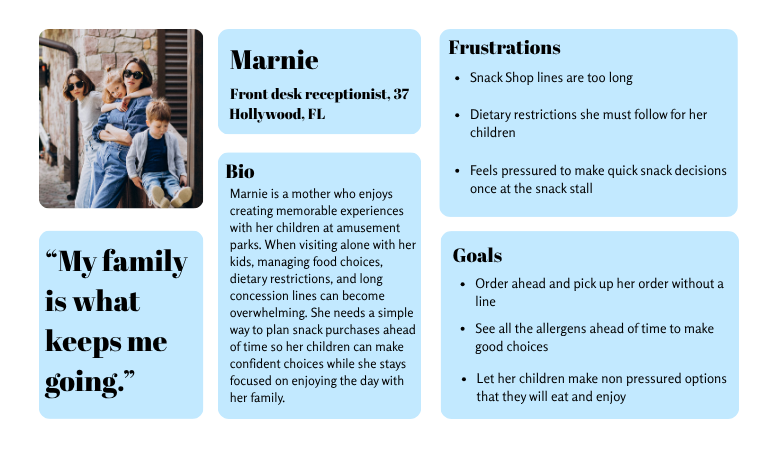
Persona # 1: The parent:
Parents visiting amusement parks often balance multiple responsibilities while trying to create an enjoyable experience for their children. Many are navigating the park on their own, making it difficult to manage long concession lines while also supervising their kids. They need a convenient way to order food that reduces stress and helps keep the day running smoothly.
Children may take extra time to choose what they want or have dietary preferences and food allergies that require careful consideration. By allowing families to browse menus and place orders before reaching the counter, parents can help their children make thoughtful decisions without the pressure of a long line, creating a more relaxed experience for both the family and concession staff.
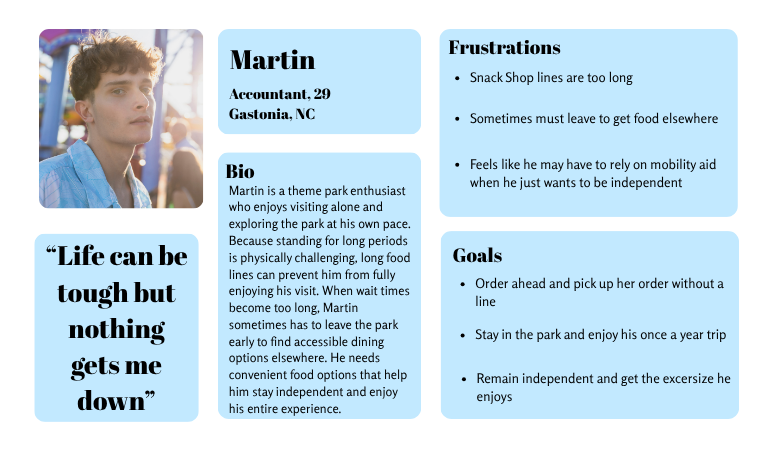
Persona # 2: The independent guest with mobility issues:
Many theme park guests with mobility challenges still want to enjoy attractions, entertainment, and memorable experiences independently. They often plan their visits around accessibility features, rest opportunities, and the amount of walking or standing required throughout the day.
For guests who have difficulty standing for extended periods, long food lines can become a major barrier to enjoying the park. Waiting for snacks or meals may require more physical effort than expected and can interrupt their experience or even force them to leave earlier than planned.
These visitors benefit from solutions that reduce unnecessary waiting, provide convenient access to food and services, and allow them to maintain their independence while exploring the park at their own pace.
Both people may have different frustrations and goals but what is consistent is the need to order ahead to skip the long lines.
Ideation Process
How can I make the process simple to use and easy for people to navigate? Will people want a way to track past snacks?
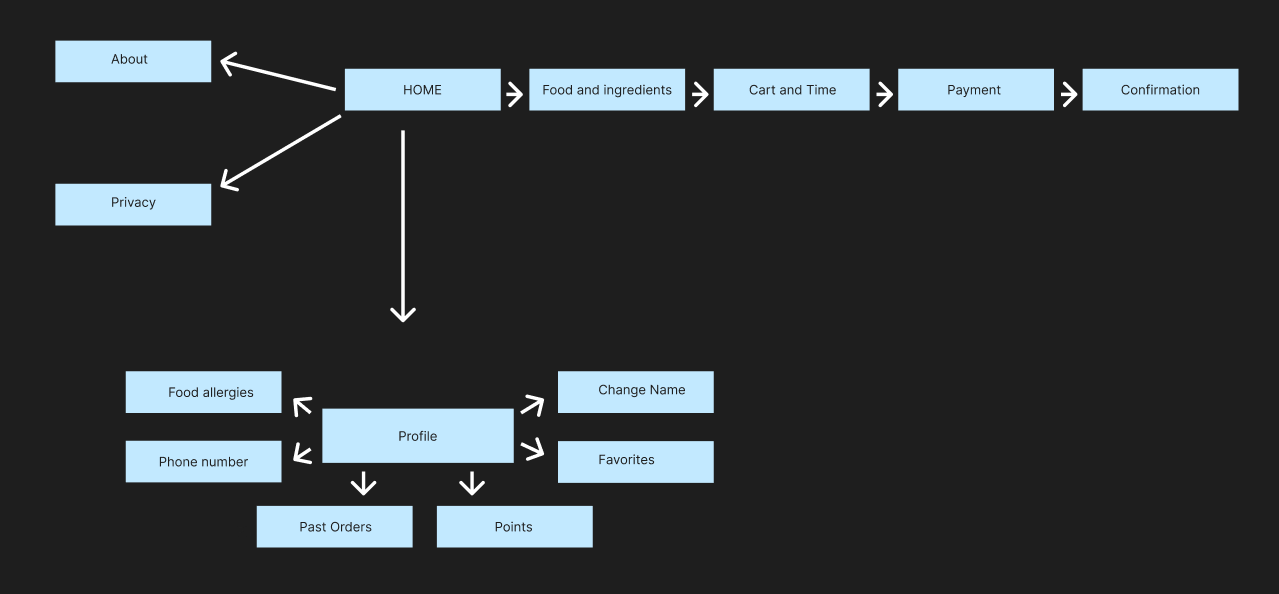
Sitemap showing simple and easy navigation.
Foundation
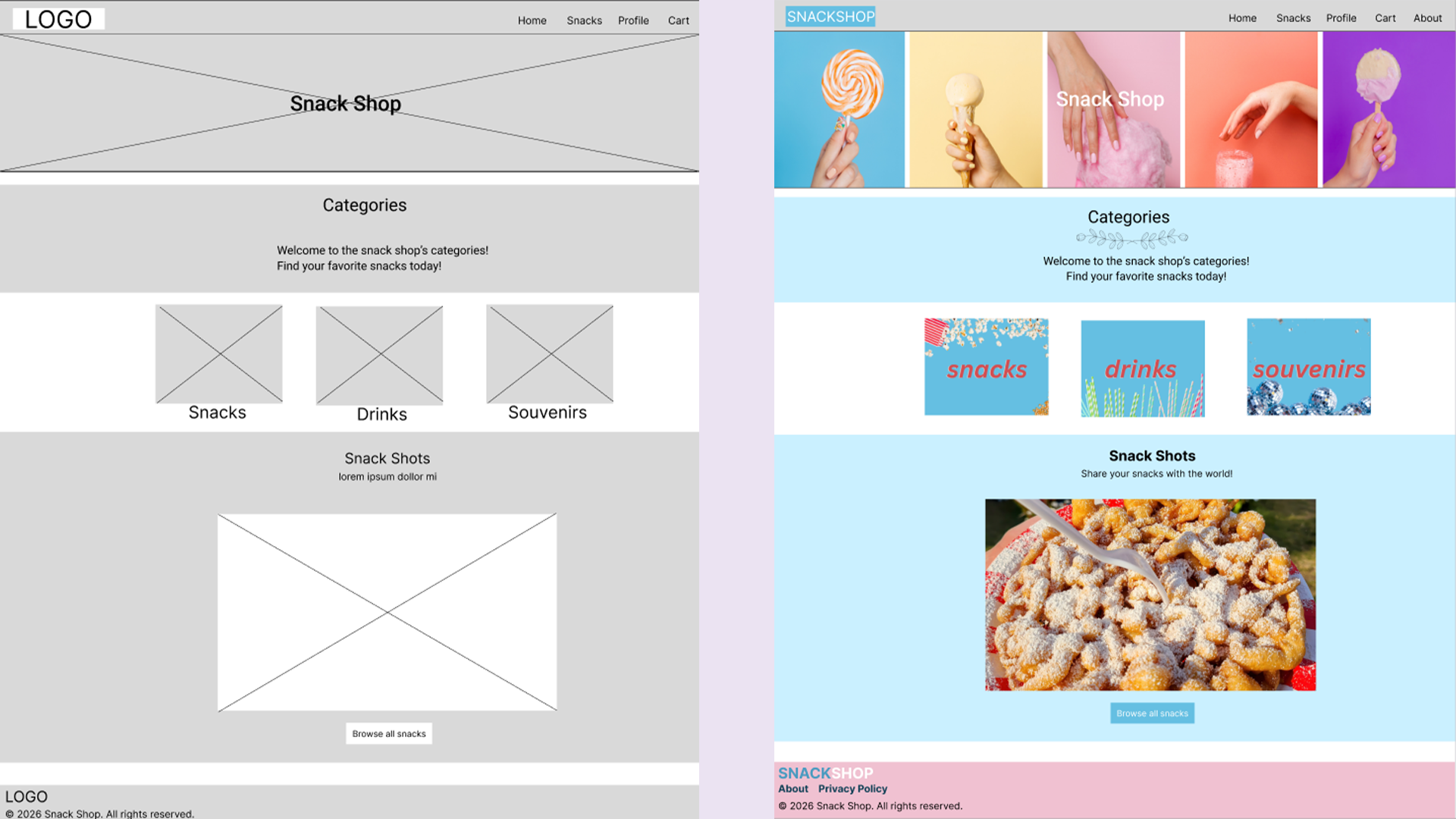
Side by side of both wireframe and mock up of the SnackShop Homepage.
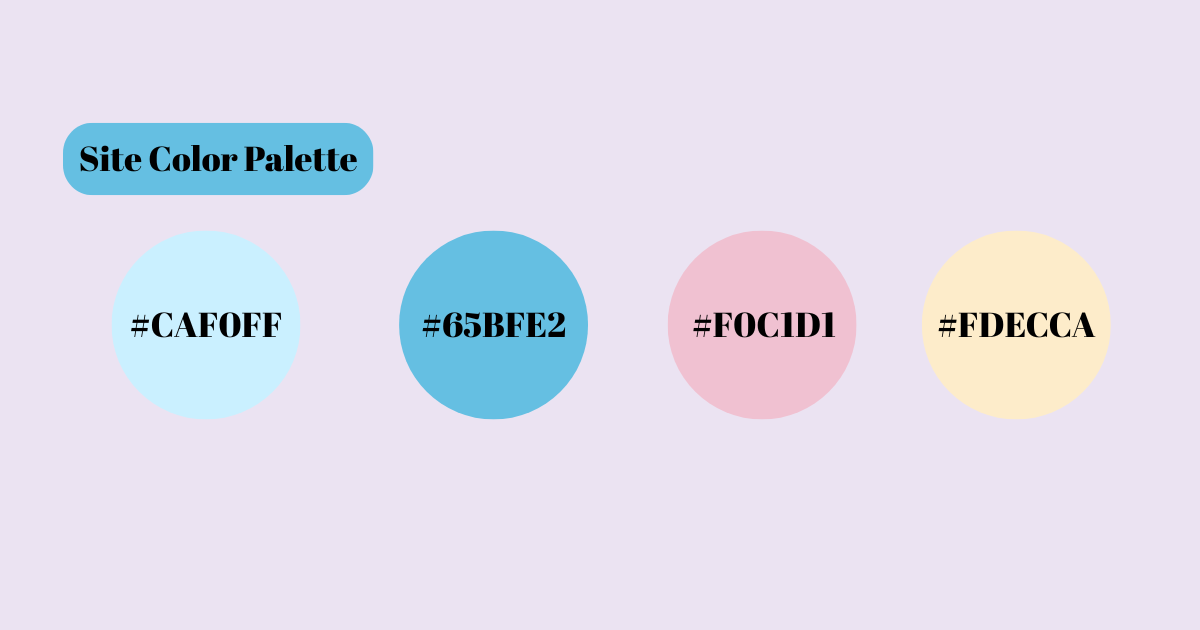
I chose these 4 colors due to being light and fun. When I looked at these colors I instantly thought about theme parks.
When coming up with a name for SnackShop I wanted things to be simple and easily understood. Since it is all things snacks it just made the most since.
Final Prototype
Want to do your own exploring? Check out the prototype Here.
Ideas to build on
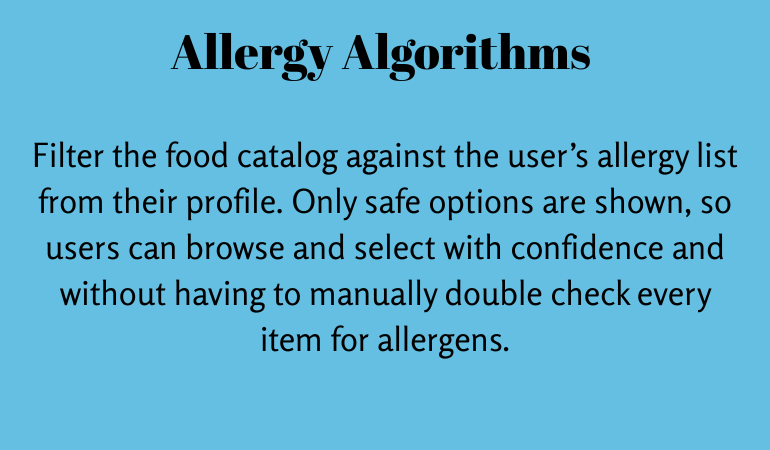
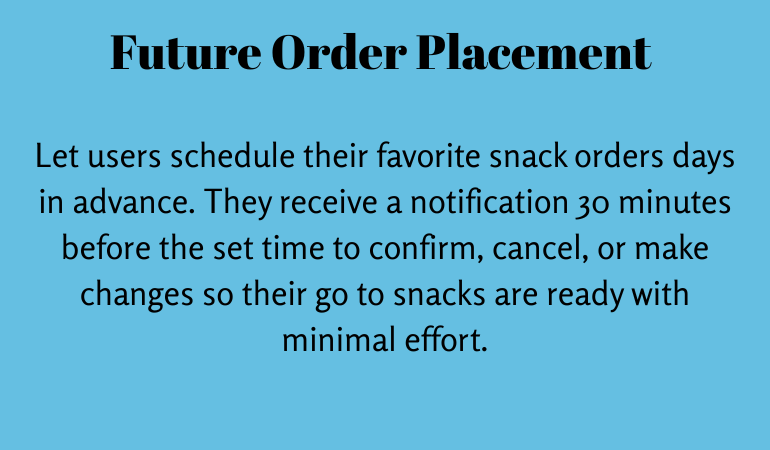
Some of the future ideas that would make this website even better.
Insights Gained
Designing MuseFinder was especially meaningful because I am an avid museum enthusiast. My personal experiences helped me recognize common challenges users face when searching for museums and accessing important information, which inspired me to create a solution that makes discovering museums simple, accessible, and efficient.
Throughout the project, I learned that simplicity can have the greatest impact. While there are additional features I would love to explore in future iterations, I chose to prioritize a clean, intuitive experience that helps users find what they need without feeling overwhelmed. This project reinforced the importance of balancing functionality with usability, ensuring that every design decision supports a seamless and enjoyable user experience.
Leave a Reply Cancel reply
How to Grow Your Coding Skill for 2024
Aliquam hendrerit sollicitudin purus, quis rutrum mi accumsan nec. Quisque bibendum orci ac nibh facilisis, at malesuada orci congue. Nullam tempus sollicitudin cursus. Ut et adipiscing erat. Curabitur this is a text link libero tempus congue.
Duis mattis laoreet neque, et ornare neque sollicitudin at. Proin sagittis dolor sed mi elementum pretium. Donec et justo ante. Vivamus egestas sodales est, eu rhoncus urna semper eu. Cum sociis natoque penatibus et magnis dis parturient montes, nascetur ridiculus mus. Integer tristique elit lobortis purus bibendum, quis dictum metus mattis. Phasellus posuere felis sed eros porttitor mattis. Curabitur massa magna, tempor in blandit id, porta in ligula. Aliquam laoreet nisl massa, at interdum mauris sollicitudin et.
rerum sit non. Lorem ipsum dolor, sit amet consectetur adipisicing elit. Fuga consequatur delectus porro sapiente molestias, magni quasi sed, sit amet consectetur adipisicing elit. Fuga consequatur delectus porro
Designer – Luis Pickford
What you’ll learn
- Become a UI/UX designer.
- You will be able to start earning money skills.
- Build a UI project from beginning to end.
- Work with colors & fonts.
- You will create your own UI Kit.
- Build & test a complete mobile app.
- Learn to design mobile apps & websites.
- Design 3 different logos.
- Create low-fidelity wireframe.
- Downloadable exercise files.

Requirements
- We do not require any previous experience or pre-defined skills to take this course. A great orientation would be enough to master UI/UX design.
- A computer with a good internet connection.
- Adobe Photoshop (OPTIONAL)
Leave a Reply Cancel reply
Best Freelance Client Management Softwares
Aliquam hendrerit sollicitudin purus, quis rutrum mi accumsan nec. Quisque bibendum orci ac nibh facilisis, at malesuada orci congue. Nullam tempus sollicitudin cursus. Ut et adipiscing erat. Curabitur this is a text link libero tempus congue.
Duis mattis laoreet neque, et ornare neque sollicitudin at. Proin sagittis dolor sed mi elementum pretium. Donec et justo ante. Vivamus egestas sodales est, eu rhoncus urna semper eu. Cum sociis natoque penatibus et magnis dis parturient montes, nascetur ridiculus mus. Integer tristique elit lobortis purus bibendum, quis dictum metus mattis. Phasellus posuere felis sed eros porttitor mattis. Curabitur massa magna, tempor in blandit id, porta in ligula. Aliquam laoreet nisl massa, at interdum mauris sollicitudin et.
rerum sit non. Lorem ipsum dolor, sit amet consectetur adipisicing elit. Fuga consequatur delectus porro sapiente molestias, magni quasi sed, sit amet consectetur adipisicing elit. Fuga consequatur delectus porro
Designer – Luis Pickford
What you’ll learn
- Become a UI/UX designer.
- You will be able to start earning money skills.
- Build a UI project from beginning to end.
- Work with colors & fonts.
- You will create your own UI Kit.
- Build & test a complete mobile app.
- Learn to design mobile apps & websites.
- Design 3 different logos.
- Create low-fidelity wireframe.
- Downloadable exercise files.

Requirements
- We do not require any previous experience or pre-defined skills to take this course. A great orientation would be enough to master UI/UX design.
- A computer with a good internet connection.
- Adobe Photoshop (OPTIONAL)
Leave a Reply Cancel reply
Best Travel & Toursim Location fo Refresh your Mind
Aliquam hendrerit sollicitudin purus, quis rutrum mi accumsan nec. Quisque bibendum orci ac nibh facilisis, at malesuada orci congue. Nullam tempus sollicitudin cursus. Ut et adipiscing erat. Curabitur this is a text link libero tempus congue.
Duis mattis laoreet neque, et ornare neque sollicitudin at. Proin sagittis dolor sed mi elementum pretium. Donec et justo ante. Vivamus egestas sodales est, eu rhoncus urna semper eu. Cum sociis natoque penatibus et magnis dis parturient montes, nascetur ridiculus mus. Integer tristique elit lobortis purus bibendum, quis dictum metus mattis. Phasellus posuere felis sed eros porttitor mattis. Curabitur massa magna, tempor in blandit id, porta in ligula. Aliquam laoreet nisl massa, at interdum mauris sollicitudin et.
rerum sit non. Lorem ipsum dolor, sit amet consectetur adipisicing elit. Fuga consequatur delectus porro sapiente molestias, magni quasi sed, sit amet consectetur adipisicing elit. Fuga consequatur delectus porro
Designer – Luis Pickford
What you’ll learn
- Become a UI/UX designer.
- You will be able to start earning money skills.
- Build a UI project from beginning to end.
- Work with colors & fonts.
- You will create your own UI Kit.
- Build & test a complete mobile app.
- Learn to design mobile apps & websites.
- Design 3 different logos.
- Create low-fidelity wireframe.
- Downloadable exercise files.

Requirements
- We do not require any previous experience or pre-defined skills to take this course. A great orientation would be enough to master UI/UX design.
- A computer with a good internet connection.
- Adobe Photoshop (OPTIONAL)
Leave a Reply Cancel reply
the window know to say beside you
Aliquam hendrerit sollicitudin purus, quis rutrum mi accumsan nec. Quisque bibendum orci ac nibh facilisis, at malesuada orci congue. Nullam tempus sollicitudin cursus. Ut et adipiscing erat. Curabitur this is a text link libero tempus congue.
Duis mattis laoreet neque, et ornare neque sollicitudin at. Proin sagittis dolor sed mi elementum pretium. Donec et justo ante. Vivamus egestas sodales est, eu rhoncus urna semper eu. Cum sociis natoque penatibus et magnis dis parturient montes, nascetur ridiculus mus. Integer tristique elit lobortis purus bibendum, quis dictum metus mattis. Phasellus posuere felis sed eros porttitor mattis. Curabitur massa magna, tempor in blandit id, porta in ligula. Aliquam laoreet nisl massa, at interdum mauris sollicitudin et.
rerum sit non. Lorem ipsum dolor, sit amet consectetur adipisicing elit. Fuga consequatur delectus porro sapiente molestias, magni quasi sed, sit amet consectetur adipisicing elit. Fuga consequatur delectus porro
Designer – Luis Pickford
What you’ll learn
- Become a UI/UX designer.
- You will be able to start earning money skills.
- Build a UI project from beginning to end.
- Work with colors & fonts.
- You will create your own UI Kit.
- Build & test a complete mobile app.
- Learn to design mobile apps & websites.
- Design 3 different logos.
- Create low-fidelity wireframe.
- Downloadable exercise files.

Requirements
- We do not require any previous experience or pre-defined skills to take this course. A great orientation would be enough to master UI/UX design.
- A computer with a good internet connection.
- Adobe Photoshop (OPTIONAL)
Leave a Reply Cancel reply
Top 10 Toolkits for Deep Learning in 2021.
Aliquam hendrerit sollicitudin purus, quis rutrum mi accumsan nec. Quisque bibendum orci ac nibh facilisis, at malesuada orci congue. Nullam tempus sollicitudin cursus. Ut et adipiscing erat. Curabitur this is a text link libero tempus congue.
Duis mattis laoreet neque, et ornare neque sollicitudin at. Proin sagittis dolor sed mi elementum pretium. Donec et justo ante. Vivamus egestas sodales est, eu rhoncus urna semper eu. Cum sociis natoque penatibus et magnis dis parturient montes, nascetur ridiculus mus. Integer tristique elit lobortis purus bibendum, quis dictum metus mattis. Phasellus posuere felis sed eros porttitor mattis. Curabitur massa magna, tempor in blandit id, porta in ligula. Aliquam laoreet nisl massa, at interdum mauris sollicitudin et.
rerum sit non. Lorem ipsum dolor, sit amet consectetur adipisicing elit. Fuga consequatur delectus porro sapiente molestias, magni quasi sed, sit amet consectetur adipisicing elit. Fuga consequatur delectus porro
Designer – Luis Pickford
What you’ll learn
- Become a UI/UX designer.
- You will be able to start earning money skills.
- Build a UI project from beginning to end.
- Work with colors & fonts.
- You will create your own UI Kit.
- Build & test a complete mobile app.
- Learn to design mobile apps & websites.
- Design 3 different logos.
- Create low-fidelity wireframe.
- Downloadable exercise files.

Requirements
- We do not require any previous experience or pre-defined skills to take this course. A great orientation would be enough to master UI/UX design.
- A computer with a good internet connection.
- Adobe Photoshop (OPTIONAL)
Leave a Reply Cancel reply
Why you Needed much more AI knowledge at this time?
Aliquam hendrerit sollicitudin purus, quis rutrum mi accumsan nec. Quisque bibendum orci ac nibh facilisis, at malesuada orci congue. Nullam tempus sollicitudin cursus. Ut et adipiscing erat. Curabitur this is a text link libero tempus congue.
Duis mattis laoreet neque, et ornare neque sollicitudin at. Proin sagittis dolor sed mi elementum pretium. Donec et justo ante. Vivamus egestas sodales est, eu rhoncus urna semper eu. Cum sociis natoque penatibus et magnis dis parturient montes, nascetur ridiculus mus. Integer tristique elit lobortis purus bibendum, quis dictum metus mattis. Phasellus posuere felis sed eros porttitor mattis. Curabitur massa magna, tempor in blandit id, porta in ligula. Aliquam laoreet nisl massa, at interdum mauris sollicitudin et.
rerum sit non. Lorem ipsum dolor, sit amet consectetur adipisicing elit. Fuga consequatur delectus porro sapiente molestias, magni quasi sed, sit amet consectetur adipisicing elit. Fuga consequatur delectus porro
Designer – Luis Pickford
What you’ll learn
- Become a UI/UX designer.
- You will be able to start earning money skills.
- Build a UI project from beginning to end.
- Work with colors & fonts.
- You will create your own UI Kit.
- Build & test a complete mobile app.
- Learn to design mobile apps & websites.
- Design 3 different logos.
- Create low-fidelity wireframe.
- Downloadable exercise files.

Requirements
- We do not require any previous experience or pre-defined skills to take this course. A great orientation would be enough to master UI/UX design.
- A computer with a good internet connection.
- Adobe Photoshop (OPTIONAL)
0 thoughts on “Why you Needed much more AI knowledge at this time?”
Leave a Reply Cancel reply
© 2026 All Rights Reserved by Kelsey Bullard.


Lorem ipsum dolor, sit amet consectetur adipisicing elit. Fuga consequatur delectus porro sapiente molestias, magni quasi sed, enim corporis omnis doloremque soluta inventore dolorum consequuntur quo